> ## Documentation Index
> Fetch the complete documentation index at: https://docs.explo.co/llms.txt
> Use this file to discover all available pages before exploring further.
# Redshift
## Intro
Find out more about Redshift [here](https://aws.amazon.com/redshift/).
## Necessary Credentials
* **Hostname**
* The server where your database lives
* Example: *rds.amazonaws.com*
* **Port**
* The port the database server uses
* Example: *5439*
* **Database name**
* Name of the database you are connecting Explo to
* Example: *acme\_production*
* **Authentication**
* Scheme you want to use (options below)
### Authentication Options
**Username and Password**
* Credentials:
* Username
* Password
**AWS IAM Authentication**
* Make sure your created IAM user has the necessary privileges in your
database to let Explo read your tables.
* To create an IAM user, see [here](https://docs.aws.amazon.com/IAM/latest/UserGuide/id_users_create.html#id_users_create_console)
* Credentials:
* Username
* AWS Region
* AWS Access Key ID
* AWS Secret Key
* SSL Cert
## Allowlisting Explo's IPs
You may need to allowlist egress IPs for your
[Connectivity Region](/data-sources/connecting-to-data-sources/connectivity-regions).
## SSH Tunnels
You can connect to Postgres databases via an SSH tunnel if necessary. Check out [this](/data-sources/connecting-to-data-sources/ssh-tunnels) section on SSH tunnels to see how.
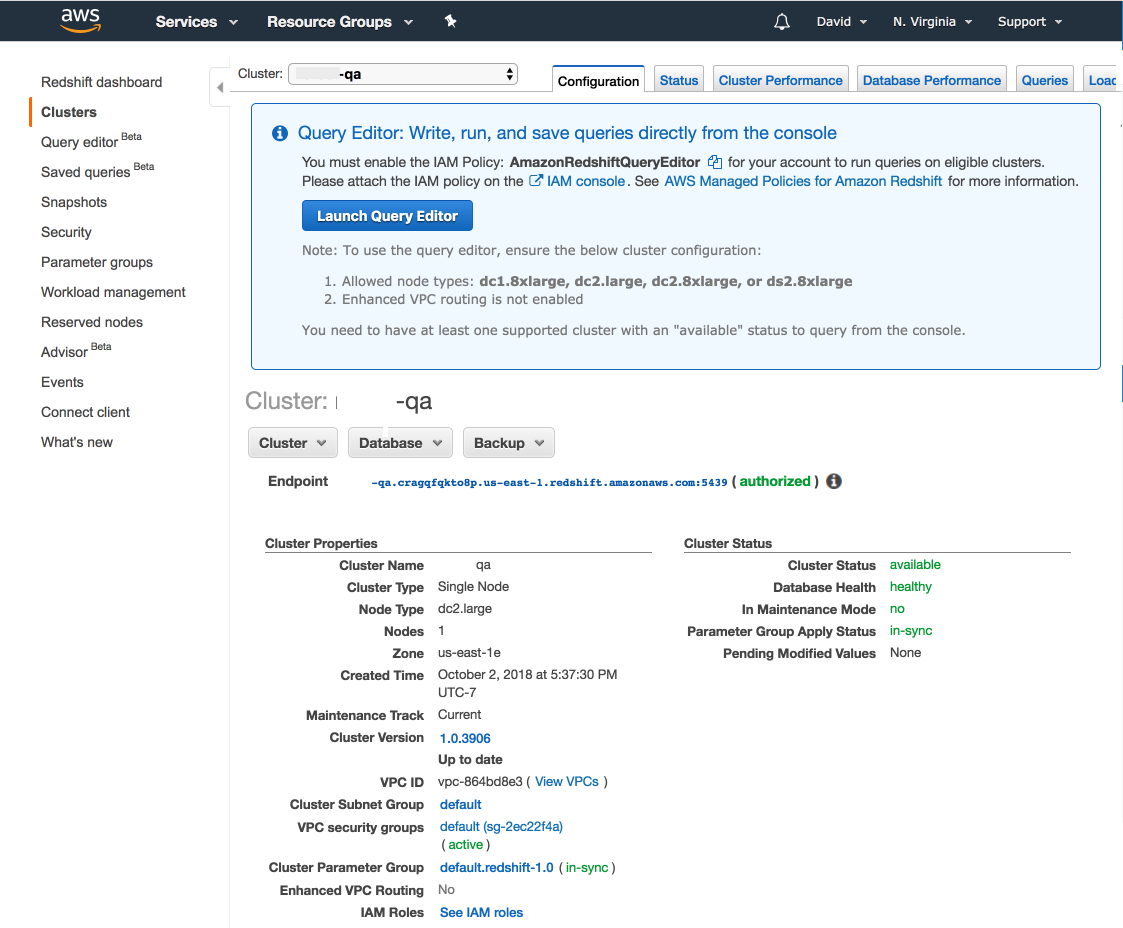
## Finding Redshift Credentials
You can find your Redshift cluster details via the AWS console. The *Endpoint*
section gives you the hostname and port all in one. You'll need to get the
database name and a username/password from whoever set up the Redshift cluster.
 ## Questions?
Please reach out to the Explo team at
[support@explo.co](mailto:support@explo.co) if you have any questions.
## Questions?
Please reach out to the Explo team at
[support@explo.co](mailto:support@explo.co) if you have any questions.