> ## Documentation Index
> Fetch the complete documentation index at: https://docs.explo.co/llms.txt
> Use this file to discover all available pages before exploring further.

# Web Component Example

In order to listen for an incoming event, you need to add an event listener for that event name. So in the example below you will see that an event listener was added for `dashboardLoaded`.

```
<!DOCTYPE html>
<html lang="en">
  <head>
    <script>
      const messageListener = (e) => {
        console.log(e.detail);
      };
      window.addEventListener("dashboardLoaded", messageListener);
    </script>
  </head>
  <body>
    <explo-dashboard
      dash-jwt="<your-jwt>"
    />
  </body>
</html>
```

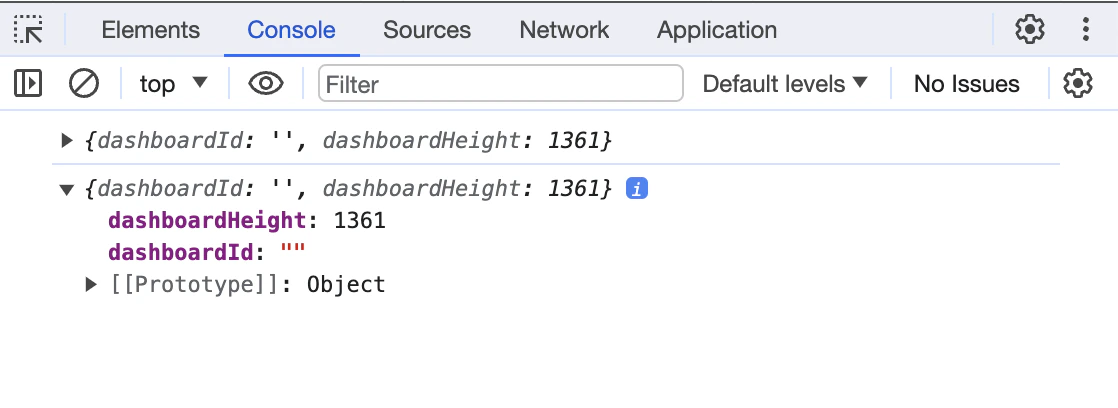
The console log output looks like this:
<img src="https://mintcdn.com/explo/CaJC4DeBEWf_KlnL/images/custom-js-events/incoming-event-web-component-output-example.png?fit=max&auto=format&n=CaJC4DeBEWf_KlnL&q=85&s=89194275a517055b5a2a490e41c0a40a" alt="iFrame output" width="1118" height="408" data-path="images/custom-js-events/incoming-event-web-component-output-example.png" />
