> ## Documentation Index
> Fetch the complete documentation index at: https://docs.explo.co/llms.txt
> Use this file to discover all available pages before exploring further.
# Creating My First Dashboard
> Follow along to this article to get started creating your first dashboard!
## Set up your datasets in your first dashboard
The first step to building your [first dashboard](https://www.explo.co/blog/what-is-a-dashboard) is to create **dashboard-specific datasets**. Although this is not required, this allows you to configure viewing permissions, configure variables, and optimize your queries that are specific to each dashboard.
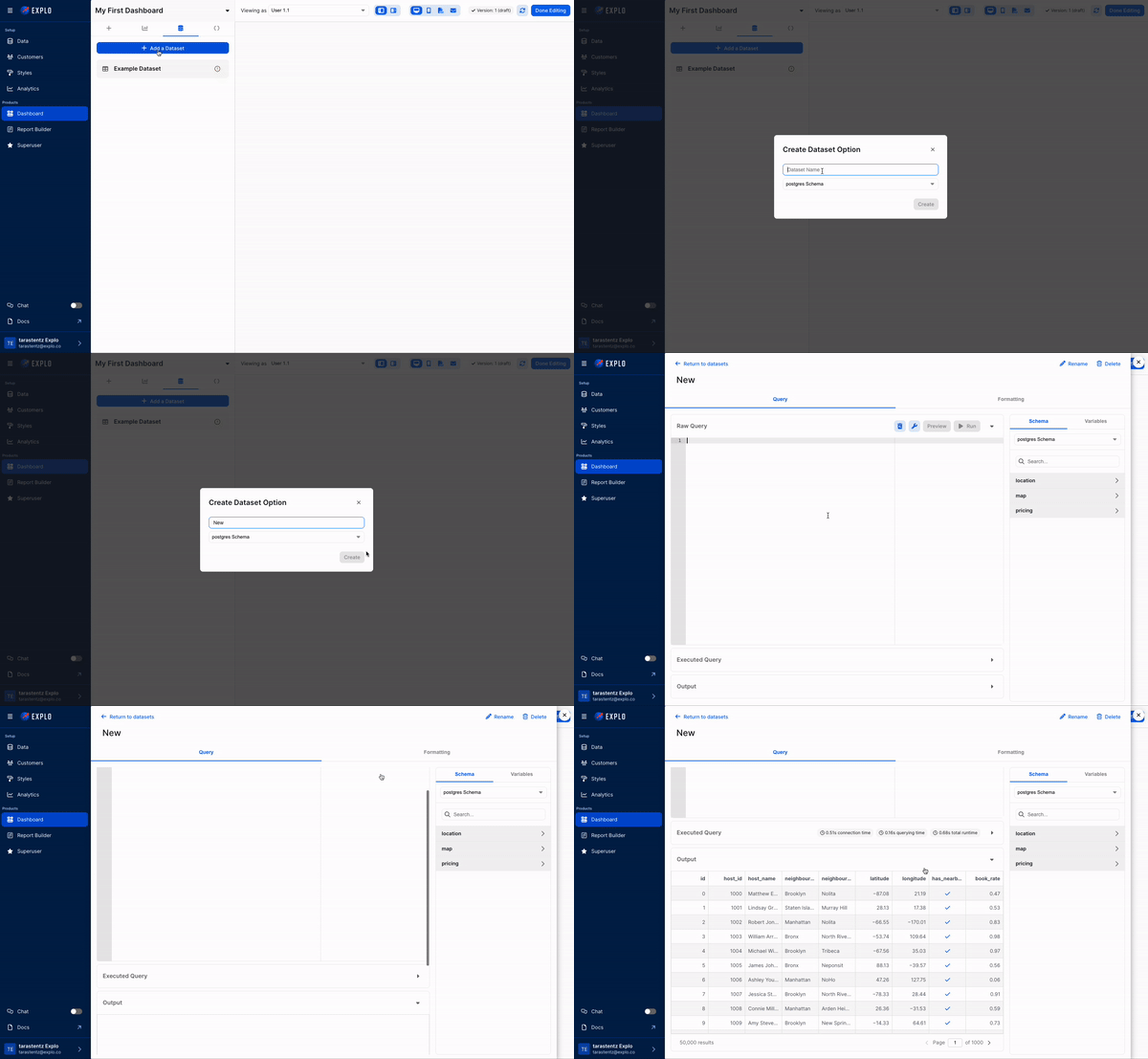 Even if you don't require any additional changes to your data, we suggest you create a new dataset and select entire tables as shown below:
```sql theme={null}
SELECT *
FROM Table_1;
```
Read more about how to use the dataset editor [here](/creating-dashboards/dataset-editor).
## Create your first data panel in your first dashboard
After you've configured your dashboard-specific dataset(s), you're now ready to create a data panel in Explo!
Simple drag and drop a `Chart Component` onto the canvas, and select the dataset you'd like to use.
Even if you don't require any additional changes to your data, we suggest you create a new dataset and select entire tables as shown below:
```sql theme={null}
SELECT *
FROM Table_1;
```
Read more about how to use the dataset editor [here](/creating-dashboards/dataset-editor).
## Create your first data panel in your first dashboard
After you've configured your dashboard-specific dataset(s), you're now ready to create a data panel in Explo!
Simple drag and drop a `Chart Component` onto the canvas, and select the dataset you'd like to use.
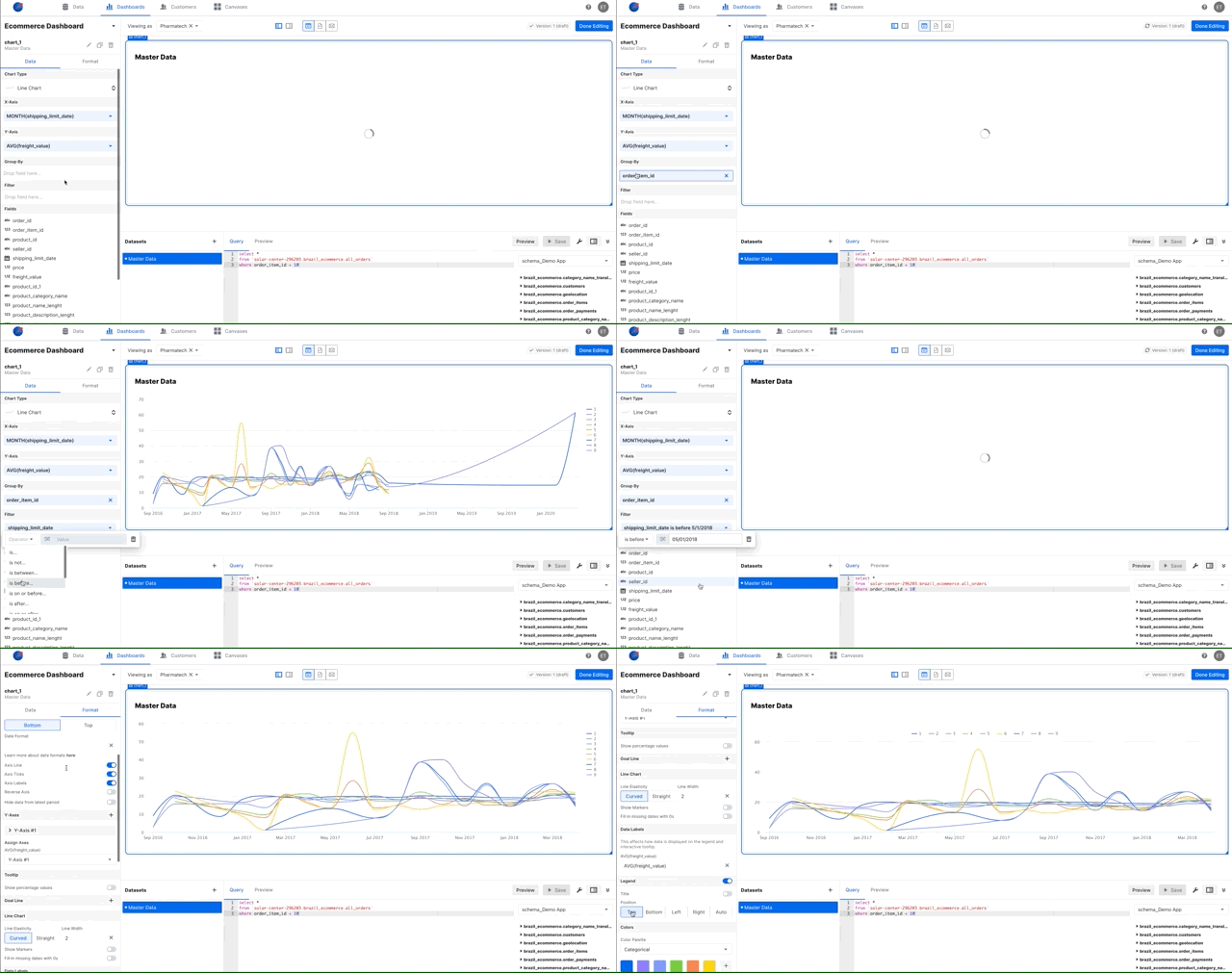 Double click on the panel you created to access the editor. There are 2 separate sections in the editor.
`Data` - select which visualization to use and configure the aggregations, filters, and different parameters
`Format` - format your visualizations that adjust labels, colors, text, and more
We encourage users to build visualizations from dashboard-specific datasets
for each dashboard and not source datasets. This allows you to configure
variables for drop-downs, user access controls, and other custom variables to
interact with your dashboard.
## Add additional components and configure variables in your first dashboard
### Adding components to your first dashboard
Add additional components to your first dashboard by dragging and dropping them onto your canvas.
### Configure variables in your datasets in your first dashboard
Some components such as [date selectors](/creating-dashboards/ui-elements/controls/date) and [dropdowns](/creating-dashboards/ui-elements/controls/dropdown) require you to add variables into your SQL queries. For more information on how to configure variables, click [here](/creating-dashboards/variables).
## Share and embed your first dashboard
Once your first dashboard is complete, you're ready to embed or share your first dashboard! Please ensure that your customers are set before this step to ensure your customer are only seeing their own data.
For more details on how to embed your first dashboard, click [here](/embedding-documentation/dashboard/option-1-web-component/).
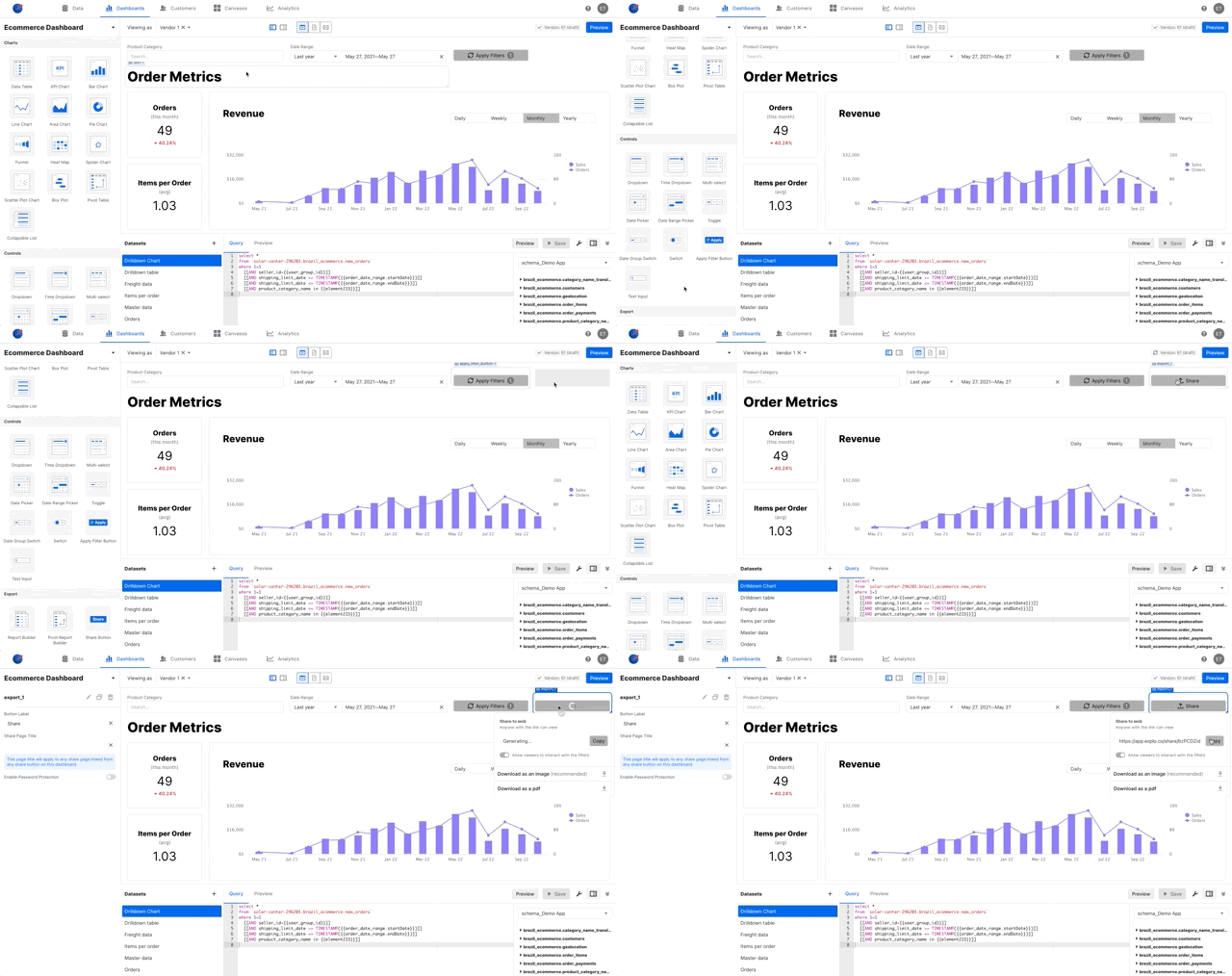
If you want your users to be able to share links or download the dashboards as a pdf, simply drag a Share component onto your dashboard.
Double click on the panel you created to access the editor. There are 2 separate sections in the editor.
`Data` - select which visualization to use and configure the aggregations, filters, and different parameters
`Format` - format your visualizations that adjust labels, colors, text, and more
We encourage users to build visualizations from dashboard-specific datasets
for each dashboard and not source datasets. This allows you to configure
variables for drop-downs, user access controls, and other custom variables to
interact with your dashboard.
## Add additional components and configure variables in your first dashboard
### Adding components to your first dashboard
Add additional components to your first dashboard by dragging and dropping them onto your canvas.
### Configure variables in your datasets in your first dashboard
Some components such as [date selectors](/creating-dashboards/ui-elements/controls/date) and [dropdowns](/creating-dashboards/ui-elements/controls/dropdown) require you to add variables into your SQL queries. For more information on how to configure variables, click [here](/creating-dashboards/variables).
## Share and embed your first dashboard
Once your first dashboard is complete, you're ready to embed or share your first dashboard! Please ensure that your customers are set before this step to ensure your customer are only seeing their own data.
For more details on how to embed your first dashboard, click [here](/embedding-documentation/dashboard/option-1-web-component/).
If you want your users to be able to share links or download the dashboards as a pdf, simply drag a Share component onto your dashboard.
 ## Some general resources and examples:
* [Database Dashboards][1]
* [DevOps Metric Dashboard][2]
* [Embedded Dashboards][3]
* [HR Dashboard][4]
* [Marketplace Dashboard][5]
* [React Dashboard][6]
* [Sales Dashboard][7]
* [Self Service Dashboard][8]
* [SQL Dashboard][9]
* [User Dashboard Design][10]
[1]: https://www.explo.co/blog/database-dashboards
[2]: https://www.explo.co/blog/designing-devops-dashboards
[3]: https://www.explo.co/blog/top-embedded-dashboards
[4]: https://www.explo.co/blog/hr-dashboard
[5]: https://www.explo.co/dashboard-gallery/online-marketplace-dashboard
[6]: https://www.explo.co/blog/react-dashboard
[7]: https://www.explo.co/blog/sales-dashboards
[8]: https://www.explo.co/blog/self-service-dashboards
[9]: https://www.explo.co/blog/sql-dashboards
[10]: https://www.explo.co/blog/user-dashboard-design
## Some general resources and examples:
* [Database Dashboards][1]
* [DevOps Metric Dashboard][2]
* [Embedded Dashboards][3]
* [HR Dashboard][4]
* [Marketplace Dashboard][5]
* [React Dashboard][6]
* [Sales Dashboard][7]
* [Self Service Dashboard][8]
* [SQL Dashboard][9]
* [User Dashboard Design][10]
[1]: https://www.explo.co/blog/database-dashboards
[2]: https://www.explo.co/blog/designing-devops-dashboards
[3]: https://www.explo.co/blog/top-embedded-dashboards
[4]: https://www.explo.co/blog/hr-dashboard
[5]: https://www.explo.co/dashboard-gallery/online-marketplace-dashboard
[6]: https://www.explo.co/blog/react-dashboard
[7]: https://www.explo.co/blog/sales-dashboards
[8]: https://www.explo.co/blog/self-service-dashboards
[9]: https://www.explo.co/blog/sql-dashboards
[10]: https://www.explo.co/blog/user-dashboard-design